The marketing team
in your pocket.
Make ads, videos and social media posts with AI, and plan your week. Approve every post, or let Autopilot run the types you choose.
Free to start. Starter and Pro monthly come with a 3-day free trial.

The marketing team
in your pocket.
New this month
More room for your next idea.
Find the tool for your next idea
Explore the new guides to motion video, competitor research and AI actors and voices.
Explore →Shape a more cinematic website
Explore the website editor’s moving type, video backgrounds and visual layout tools.
Explore →Give an existing video a new finish
Add captions, motion and sound to an existing video with Add effects.
Explore →One line in.
A week of marketing out.
This is the whole product in one sentence. You say what you want in the words you would use to a person, and the work comes back made.

- “Give me a week of posts for my coffee shop.”Seven ideas, made and scheduled
- “Sell my new preset pack for £12.”A page, a checkout and the posts
- “Run £5 a day of ads on the new flavour.”A campaign that goes live when you confirm the budget
- “What should I be posting in October?”A month’s plan, in plain English
- “A birthday message for my mum, from her dog.”A finished film, ready to send
Approve each post, or let Autopilot publish the types you set to Just post.
335 ways to make something.
Name one, or let Soclo pick.
Hero shots, before-and-afters, testimonials, recipe clips, birthday messages, fly-throughs. Ask in your own words and Soclo chooses the right one, or say the name and it uses exactly that.
























The complicated stuff,
made simple.
Planning, content, the website, the ads, the payments and the replies. All in one app, and every part works on its own. Use what helps today. Add the rest when it helps tomorrow.
A plan you did not have to write
One line in, a marketing plan out. Every idea appears in Strategy with the reason behind it, so you can see the month before you agree to it.
See Strategy 02Content made for you
Make ads, videos and social media posts with AI. Describe your idea, then review the result before choosing what to do with it.
See the studio 03A proper editor
A real editor for pictures and video, and for every word, page and layout. Change the thing itself instead of asking for another go.
See the editor 04Autopilot
Choose how often you want to post and Soclo plans, makes and schedules on that rhythm. Every post waits for your approval by default; switch a type to Just post and it goes out for you.
See Autopilot 05Paid ads, and Ads Watch
Run ads on the big networks from one place. You set the cap. Ads Watch then keeps an eye on your live campaigns and pauses what is wasting money.
See Ads Watch 06A website that sells
A cinematic website you edit like a document, with a Soclo Pay checkout so you can sell a digital product in pounds or dollars.
See the website builder 07One inbox
Comments, reviews, mentions and messages from every platform land in one place, and you reply from there.
See the inbox 08Works with your own AI
Connect ChatGPT, Claude, Grok Bot, Manus, Kimi or another AI to Soclo and ask it there instead. Same account, same brand, same posting.
See how to connectThree steps.
That is the whole job.
- 1
Write one line
In Soclo, or in the AI you already talk to. Plain English. No brief, no form, no course.
- 2
Look at what is planned
Every idea shows up before anything is made or spent. Approve it, swap it for another, or add a line of direction.
- 3
Say yes
Soclo makes it and posts it to the platforms you have connected once you approve it, or on its own for the types you have set to Just post, and the plan carries on to the same schedule next week.
A business, a following,
or something of your own.
Soclo asks you this when you sign up, and the whole app changes shape around your answer. Pick yourself and see what it looks like.
You run something
A shop, a service, a trade, a place people come to. Show up every week without giving up an evening to it, and keep the website, the ads and the replies in one place.
A bike shop, a salon, a plumber, a cafeSee it for a business CreatorYou are building a following
Keep posting in your own voice while you get on with making things. Soclo plans the week and cuts it for every platform, drafted on the rhythm you choose.
A channel, a newsletter, a podcast, a pageSee it for a creator PersonalYou have something to share
A thing you make, a cause, an event, a message for somebody. No business, no brand plan, no marketing job. Say what it is and Soclo makes it.
A birthday film, a fundraiser, a market stallSee the templates
Already living in Claude?
Ask it there instead.
Connect Soclo to the assistant you already pay for. Ask for a post, an advert or a change to your website in the chat you are already in, and Soclo makes it and gets it ready for you to approve and post.
https://mcp.soclo.app/mcp/authA week of posts,
without doing it all yourself.
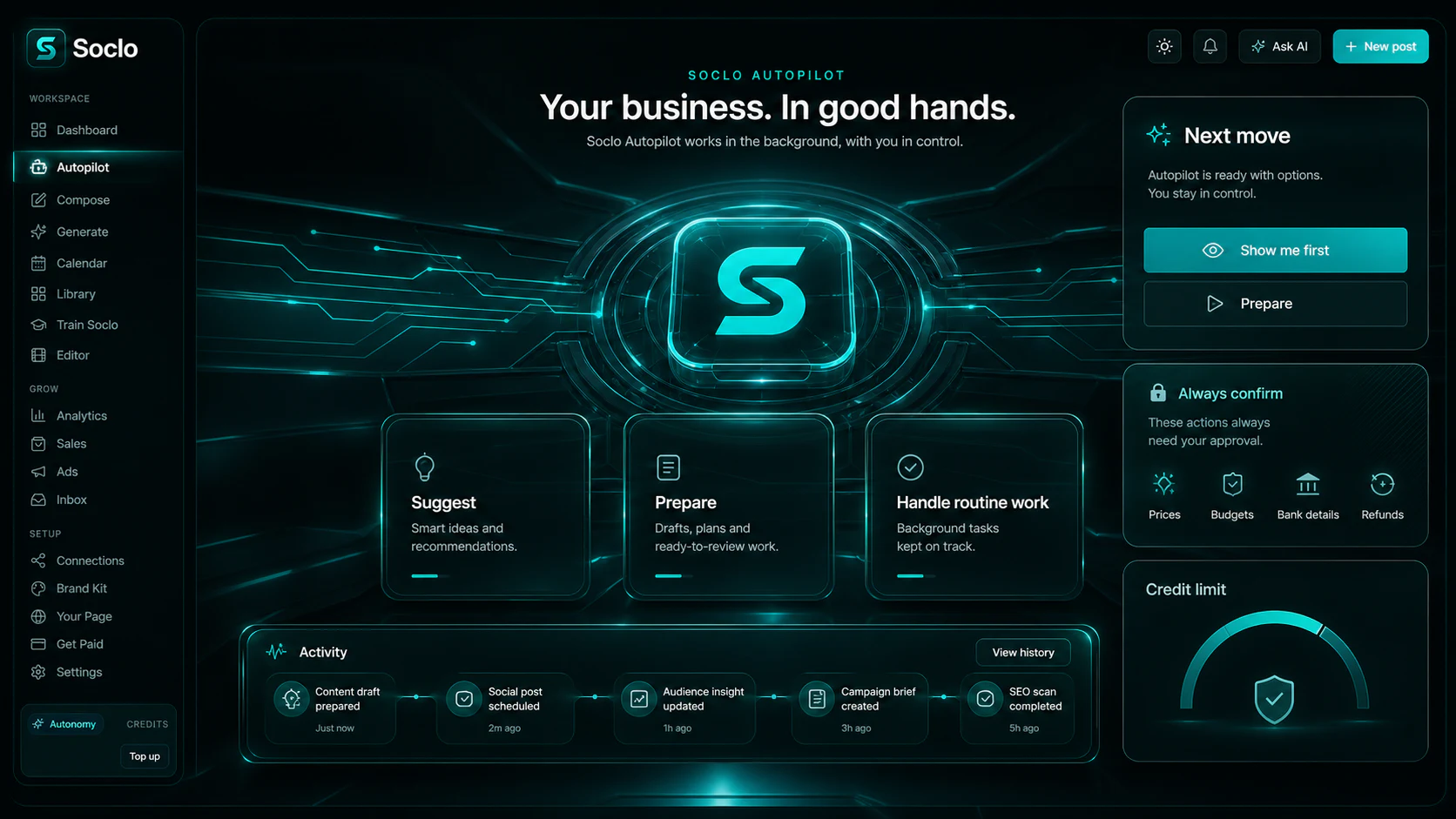
Tell Soclo how often you want to show up. It plans the ideas, makes the content and schedules it. Approve every post, or switch a type to Just post and it posts for you, week after week.
- ✓You choose the schedule: a post a day, three a week, or whatever suits you.
- ✓Every planned idea appears in Strategy before anything is made or spent.
- ✓Approve every post by default, or switch a type to Just post and Autopilot sends it for you.
Run the ads.
Then let Soclo watch them.
Paid ads on Facebook, Instagram, Snapchat, TikTok, X, Google and more, from one place. Snapchat ads come with guided setup. You set the cap, and you choose whether Soclo asks first or does it for you.
- ✓Watches your live campaigns and your spend around the clock.
- ✓Pauses what is wasting money and tells you what it did.
- ✓One switch. On or off, whenever you like.
Explore Ads Watch and its current availability before choosing how to manage your campaigns.
See Ads and Ads Watch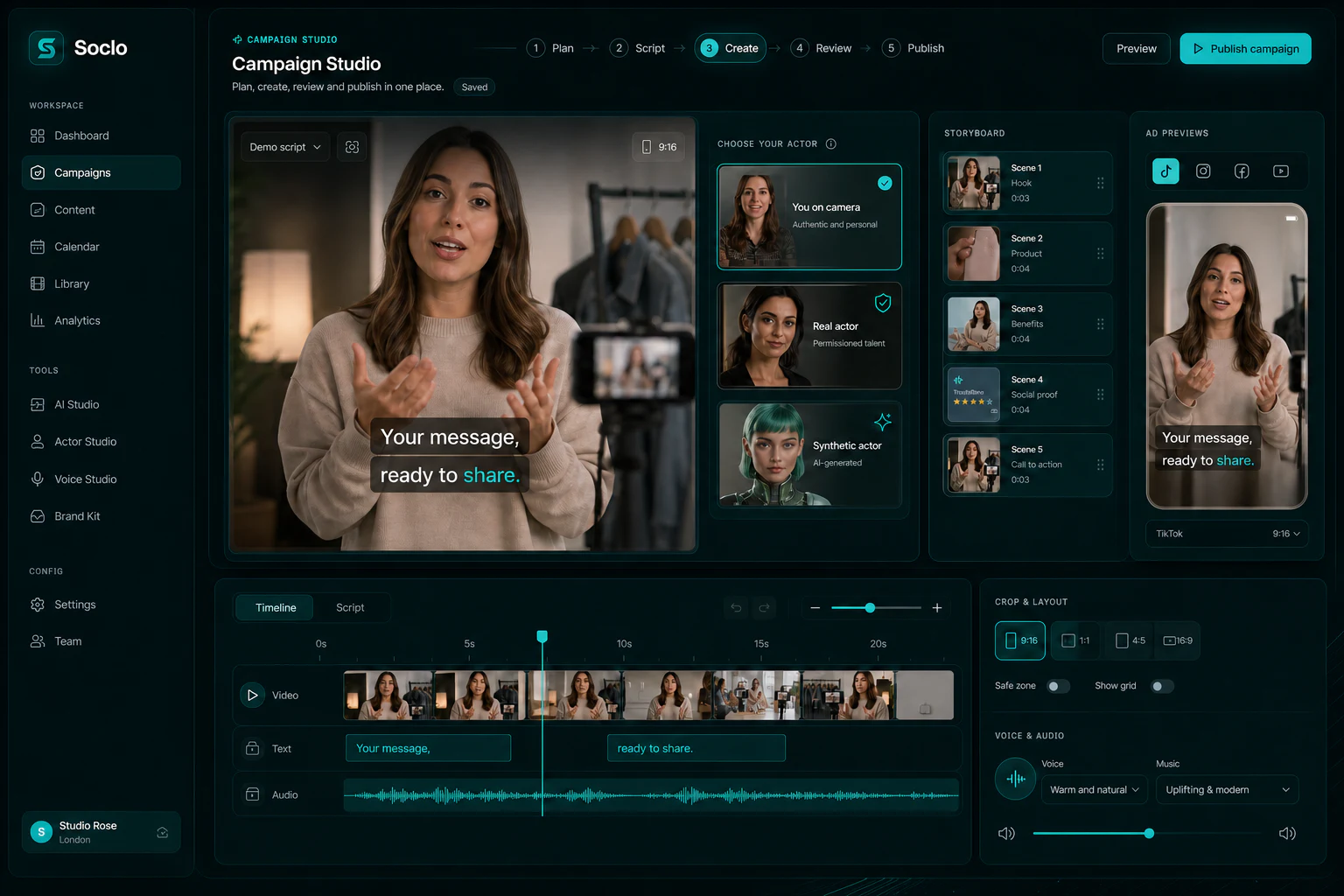
A place to share your business.
With a way to buy on it.
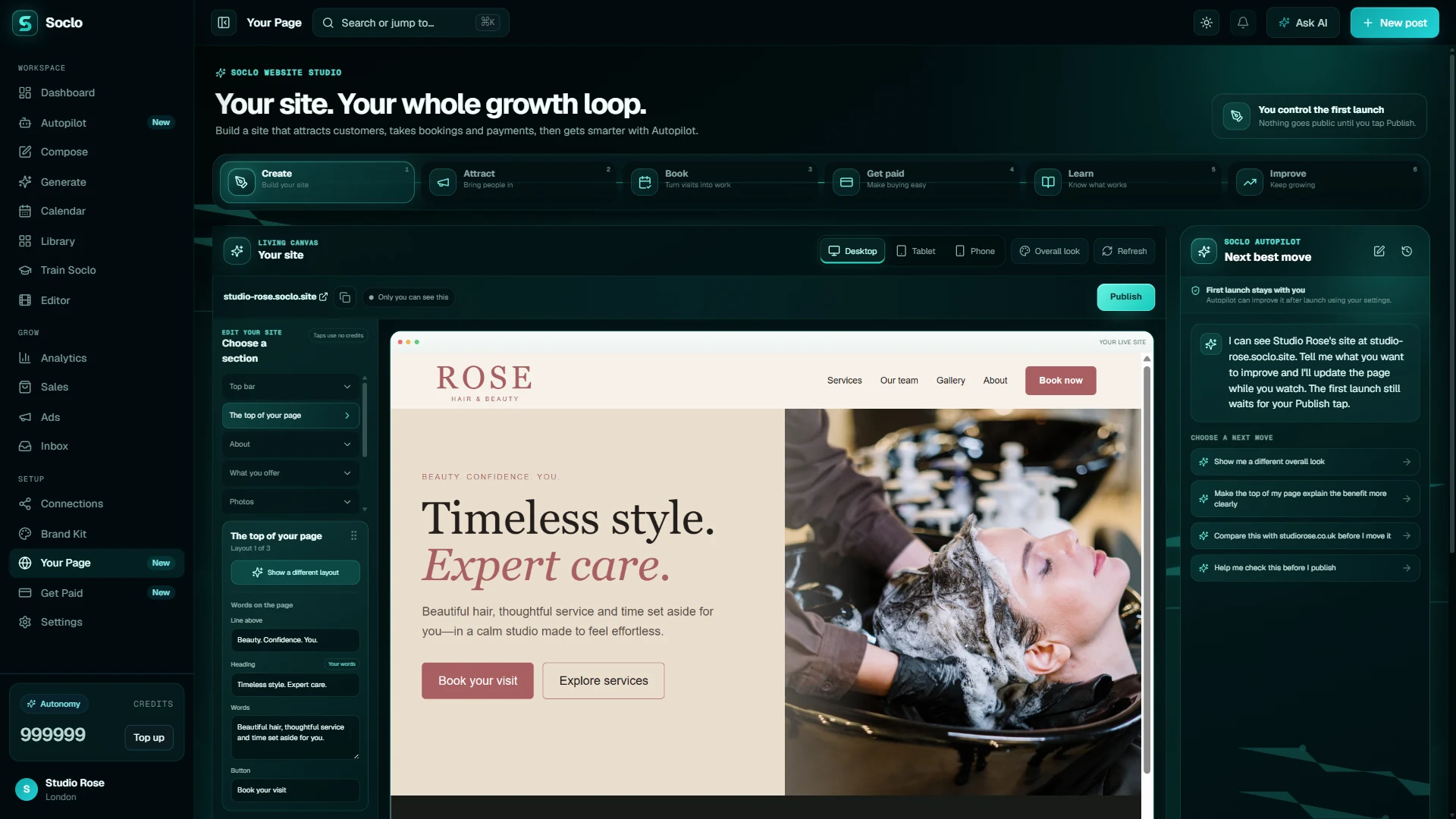
Soclo builds you a cinematic website from what you already have, and you edit it like a document. Add a Soclo Pay checkout and you can sell a digital product in pounds or dollars from the same page.
- ✓Edit any word, picture or section yourself, in plain English.
- ✓Nothing goes public until you tap Publish.
- ✓Take payment for a digital product, and see the orders next to your marketing.
Everything people say to you,
in one list.
Comments, reviews, mentions and messages from every platform you have connected arrive in one place. Read them together and reply from there, instead of opening five apps to find out who needs an answer.
See the inbox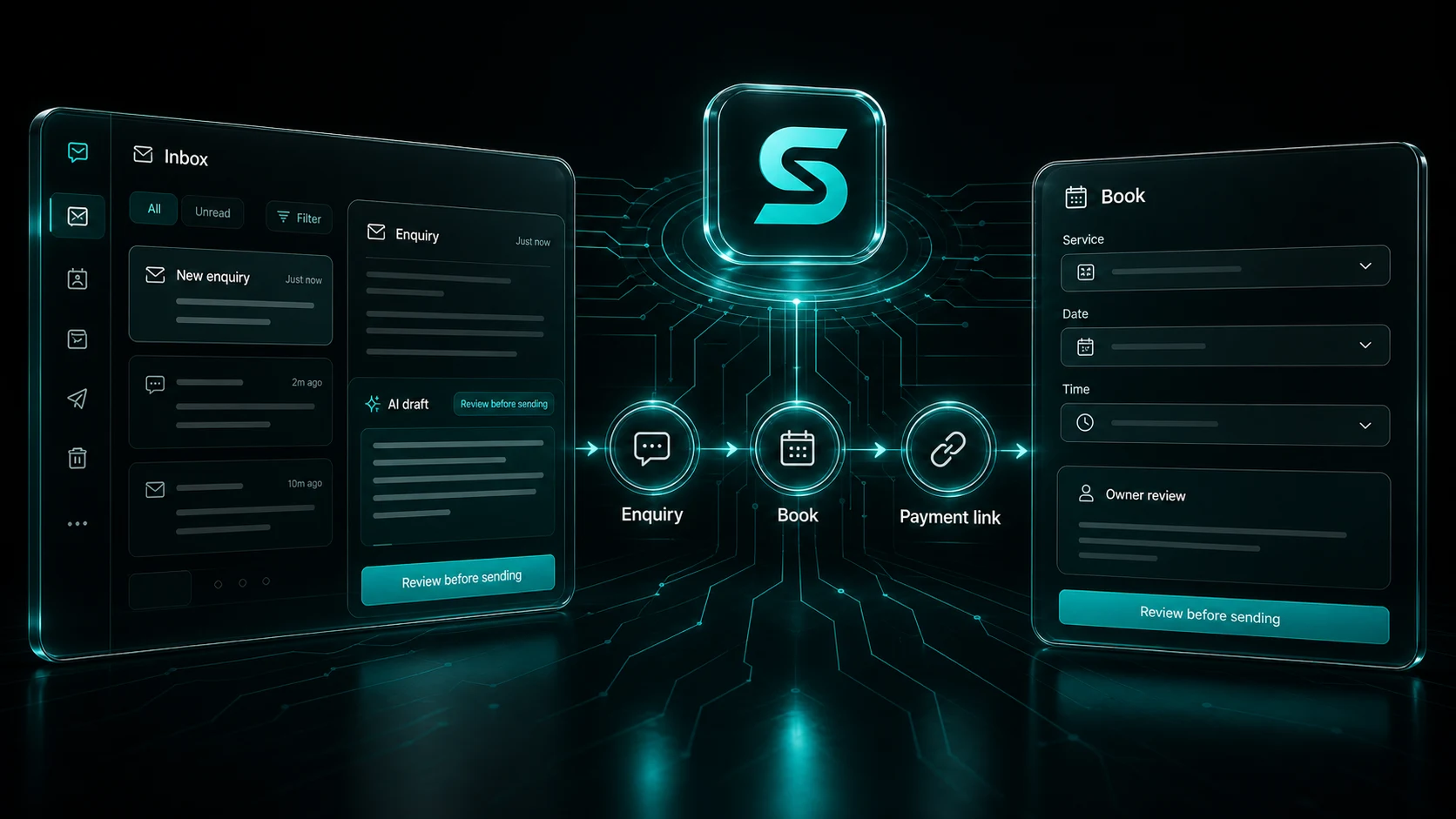
Tools to bring
your content to life.
Soclo films with Seedance 2.5, Wan 3.0 Prime, MiniMax H3 Max, Kling v3 and Veo 3.1, draws with GPT Image 2.5 and more, and speaks with ElevenLabs. You do not pick one, learn one, or pay for them separately — you write one line, and Soclo sends the job to whichever one is best at it.
- Seedance 2.5Filming up to thirty seconds in one unbroken take, with sound.
- Wan 3.0 PrimeClean 1080p motion, with a first frame, a last frame or reference photos to steer it.
- MiniMax H3 MaxWords on screen, and a lot of direction in one prompt.
- Kling v3Holding one person’s face across a whole clip from a single photo.
- Veo 3.1Believable scenes built around a reference photo, with sound the camera generates itself.
- GPT Image 2.5Getting a real product to look like itself, and following an instruction exactly.
- Seedream 4Text inside a picture, at very high resolution, quickly.
- Nano Banana ProThe same photoreal look with more detail held in it.
- FLUX.1 Kontext [pro]Changing one thing in a photo and leaving everything around it alone.
- Seedance 2.5
- Wan 3.0 Prime
- MiniMax H3 Max
- Kling v3
- Kling v3 Pro
- Veo 3.1
- Veo 3.1 Fast
- Veo 3.1 Lite
- GPT Image 2.5
- Seedream 4
- Nano Banana 2
- Nano Banana Pro
- Gemini 2.5 Flash Image
- FLUX.1 Kontext [pro]
- Bria RMBG 2.0
- Clarity Upscaler
- ElevenLabs Turbo v2.5
- Stable Audio
15 platforms.
One tap.
Write once and Soclo fits it to each place it is going. On every plan, including the free one. Snapchat opens straight into Snapchat so you can finish the post there.
- TikTok
- Snapchat
- YouTube Shorts
- Google Business
- Threads
- X
- Bluesky
- Telegram
- Discord
Start with an account.
Choose the credits you need.
Free to start. Starter and Pro monthly come with a 3-day free trial, and yearly billing costs less than paying monthly.
For posting every week without it being your evening.
Choose StarterEvery account gets an invite code. When a friend you invited starts a paid plan, you both get free credits.
 Founder · Socialiser App Ltd
“Every Sunday night went the same way. Write a caption, resize the photo, rewrite it for the next place, copy it over again. None of it was hard. All of it ate an evening. So I built the app I actually wanted, and kept building until the whole job fit inside it.”
Founder · built in the UK, for businesses, creators and makers anywhere
The things people ask first.
What is Soclo?
Soclo AI Content and Marketing brings AI content creation and social media planning into one app for businesses of all sizes, creators and anyone with something to share. Make ads, videos and social media posts, plan your week, and keep your Brand Kit and saved work together.
How much does Soclo cost?
Creating an account is free, with no included AI credits. Starter costs £7.99 per month, Pro costs £19.99 per month, Business costs £49.99 per month, Autonomy costs £99.99 per month. Annual subscriptions and one-off credit packs are also available. Prices here are in GBP; check the purchase details where you subscribe.
Does Soclo work in ChatGPT and Claude?
Yes. Connect your Soclo account through the Soclo connector to make content and prepare posts from Claude or ChatGPT. Publishing through the connector requires your confirmation. Your assistant must support a remote MCP connector; availability depends on its plan and settings.
Can I choose whether Autopilot posts for me?
Yes. Autopilot plans your week. Approve every post, or switch the content types you choose to Just post so Autopilot can schedule and publish those without asking each time.
Can I create voice, music and sound effects?
Yes. Soclo includes voice, music and sound effects, with a fixed credit price shown before you pay.
Can I use my own photos and brand?
Yes. Start a social media post with your own photo and an editable caption. Keep your logo, colours and photos in your Brand Kit, and find saved photos and videos in your Library.
What if a paid picture does not arrive?
Check your Library and credit balance before trying again. If the result or charge is unclear, contact support with the time and any request reference shown in the app. A lost connection alone does not confirm that a refund completed.
Write one line.
Let Soclo do the marketing.
Free to start, on the App Store, Google Play and the web.